Sunday, August 4, 2019

Spectum LSF MultiCluster Job Forwarding Model - Configurations

IBM® Spectrum LSF (formerly IBM® Platform™ LSF®) is a complete workload management solution for demanding HPC environments. Featuring intelligent, policy-driven scheduling and easy to use interfaces for job and workflow management, it helps organizations to improve competitiveness by accelerating research and design while controlling costs through superior resource utilization. There are two Spectrum LSF  Multi-cluster Models : Job Forward Mode and Lease Mode. You could refer another blog for configuring your cluster to Lease Mode. Click here . Lets learn Job forwarding  Mode for Spectrum LSF cluster in sections below.

Job forwarding model overview
In this model, the cluster that is starving for resources sends jobs over to thecluster that has resources to spare. Job status, pending reason, and resource usageare returned to the submission cluster. When the job is done, the exit code returns to the submission cluster.

By default, clusters do not share resources, even if MultiCluster has been installed. To enable job forwarding, enable MultiCluster queues in both the submission and execution clusters.

How it works :
With this model, scheduling of MultiCluster jobs is a process with two schedulingphases:
- the submission cluster selects a suitable remote receive-jobs queue, and forwards the job to it
- the execution cluster selects a suitable host and dispatches the job to it.If a suitable host is not found immediately, the job remains pending in the execution cluster, and is evaluated again the next scheduling cycle.This method automatically favors local hosts; a MultiCluster send-jobs queue always attempts to find a suitable local host before considering a receive-jobs queue in another cluster.
 
Send-jobs queue
A send-jobs queue can forward jobs to a specified remote queue. By default, LSF attempts to run jobs in the local cluster first. LSF only attempts to place a job remotely if it cannot place the job locally.
Receive-jobs queue
A receive-jobs queue accepts jobs from queues in a specified remote cluster. Although send-jobs queues only forward jobs to specific queues in the remote cluster, receive-jobs queues can accept work from any and all queues in the remote cluster.
Multiple queue pairs
  • You can configure multiple send-jobs and receive-jobs queues in one cluster.
  • A queue can forward jobs to as many queues in as many clusters as you want, and can also receive jobs from as many other clusters as you want.
  • A receive-jobs queue can also borrow resources using the resource leasing method, but a send-jobs queue using the job forwarding method cannot also share resources using the resource leasing method.

In LSF multicluster capability job forwarding mode, filters out-put to display information on forwarded jobs, including the forwarded time and the name of the cluster to which the job was forwarded. -fwd can be used with other options to further filter the results. 
For example, bjobs -fwd -r displays only forwarded running jobs.In LSF multicluster capability job forwarding mode, you can use the local job ID and cluster name to retrieve the job details from the remote cluster. The query syntax is:

bjobs submission_job_id@submission_cluster_name 

Additional Output fields for bjobs
  
       +--------------------+-----+----------+--------------+--------+
       | Field name         | Wid | Aliases  | Unit         | Catego |
       |                    | th  |          |              | ry     |
       +--------------------+-----+----------+--------------+--------+
       +--------------------+-----+----------+--------------+--------+
       | forward_cluster    | 15  | fwd_clus |              | MultiC |
       |                    |     | ter      |              | luster |
       |--------------------|-----|----------|--------------|        |
       | forward_time       | 15  | fwd_time | time stamp   |        |
       |--------------------|-----|----------|--------------|        |
       | srcjobid           | 8   |          |              |        |
       |--------------------|-----|----------|--------------|        |
       | dstjobid           | 8   |          |              |        |
       |--------------------|-----|----------|--------------|        |
       | source_cluster     | 15  | srcluste |              |        |
       |                    |     | r        |              |        |
       +--------------------+-----+----------+--------------+--------+ 

Cluster Configurations:

List the clusters with  basic information :
[sachinpb@powerNode06 ~]$ lsclusters
CLUSTER_NAME   STATUS   MASTER_HOST         ADMIN      HOSTS  SERVERS
ppc_cluster1               ok            powerNode06              lsfadmin            5             5
x86-64_cluster           ok        RemoteClusterHost07      lsfadmin            8            8
[sachinpb@powerNode06 ~]$
List hosts on each cluster
[sachinpb@powerNode06 ~]$ bhosts -w
HOST_NAME             STATUS          JL/U    MAX  NJOBS    RUN  SSUSP  USUSP    RSV
powerNode01                    ok              -             80      0                 0      0                  0      0
powerNode02                    ok              -             80      0                 0      0                  0      0
powerNode03                    ok              -             80      0                 0      0                  0      0
powerNode04                    ok              -             80      0                 0      0                  0      0
powerNode05                    ok              -             80      0                 0      0                  0      0
 [sachinpb@powerNode06 ~]$
 --------------------------  Other cluster ----------------------
[sachinpb@RemoteClusterHost7 ~]$ bhosts -w 
HOST_NAME                STATUS          JL/U    MAX  NJOBS    RUN  SSUSP  USUSP    RSV 
RemoteClusterHost01         ok                -     40              0             0      0                  0      0
RemoteClusterHost02         ok                -     40              0             0      0                  0      0
RemoteClusterHost03         ok                -     40              0             0      0                  0      0
RemoteClusterHost04         ok                -     40              0             0      0                  0      0
RemoteClusterHost05         ok                -     40              0             0      0                  0      0
RemoteClusterHost06         ok                -     40              0             0      0                  0      0
RemoteClusterHost07         ok                -     40              0             0      0                  0      0
RemoteClusterHost08         ok                -     40              0             0      0                  0      0
[sachinpb@RemoteClusterHost7 ~]$

Displays information about IBM Spectrum LSF multicluster capability
[sachinpb@powerNode06 ~]$ bclusters -w
LOCAL_QUEUE                JOB_FLOW    REMOTE                  CLUSTER              STATUS
send_queue                     send              receive_queue          x86-64_cluster2         ok
x86_perf_q                       send               x86_perf_q               x86-64_cluster2        ok
x86_ibmgpu_q                  send               x86_ibmgpu_q         x86-64_cluster2         ok

[Resource Lease Information ]
No resources have been exported or borrowed
 
[sachinpb@powerNode06 ~]$

Configuration file :
 

To make a queue that only runs jobs in remote clusters, take the following steps:

Procedure

  1. Edit the lsb.queues queue definition for the send-jobs queue.
    1. Define SNDJOBS_TO. This specifies that the queue can forward jobs to specified remote execution queues.
    2. Set HOSTS to none. This specifies that the queue uses no local hosts.
    3.  Set MAX_RSCHED_TIME=infinit to maintain FCFS job order
  2. Edit the lsb.queues queue definition for each receive-jobs queue.
    1. Define RCVJOBS_FROM. This specifies that the receive-jobs queue accepts jobs from the specified submission cluster.
    2.  Set HOSTS  - list of all execution hosts

Update $LSF_HOME/conf/lsbatch/ppc_cluster1/configdir/lsb.queues
--------------------------------------------------
Begin Queue
QUEUE_NAME     = send_queue
SNDJOBS_TO     = receive_queue@x86-64_cluster2
HOSTS          = none
PRIORITY       = 30
NICE           = 20
End Queue

--- on Other cluster--- Begin Queue
QUEUE_NAME      = receive_queue
RCVJOBS_FROM    = send_queue@ppc_cluster1
HOSTS           = RemoteClusterHost01 RemoteClusterHost02 RemoteClusterHost03 RemoteClusterHost04 RemoteClusterHost05 RemoteClusterHost06 RemoteClusterHost07 RemoteClusterHost08
PRIORITY        = 55
NICE            = 10
EXCLUSIVE       = Y
DESCRIPTION     = Multicluster Queue
End Queue ---------------------------------------------------------------------------------

Begin Queue
QUEUE_NAME   = x86_gpu_q
SNDJOBS_TO   = x86_gpu_q@x86-64_cluster2
PRIORITY     = 90
INTERACTIVE  = NO
FAIRSHARE    = USER_SHARES[[default,1]]
HOSTS        = none
EXCLUSIVE    = Y
MAX_RSCHED_TIME = infinit
DESCRIPTION  = For x86jobs, Multicluster Queue - Job forward Mode
End Queue

----on Other cluster--
Begin Queue
QUEUE_NAME      = x86_gpu_q
RCVJOBS_FROM    = x86_gpu_q@ppc_cluster1
HOSTS           = RemoteClusterHost01 RemoteClusterHost02 RemoteClusterHost03 RemoteClusterHost04 RemoteClusterHost05 RemoteClusterHost06 RemoteClusterHost07 RemoteClusterHost08
PRIORITY        = 55
NICE            = 10
EXCLUSIVE       = Y
DESCRIPTION     = Multicluster Queue - Job forward Mode
End Queue
---------------------------------------------------------------------------------------

Begin Queue
QUEUE_NAME   = x86_perf_q
SNDJOBS_TO   = x86_perf_q@x86-64_cluster2
PRIORITY     = 40
INTERACTIVE  = NO
FAIRSHARE    = USER_SHARES[[default,1]]
HOSTS        = none
EXCLUSIVE    = Y
MAX_RSCHED_TIME = infinit
DESCRIPTION  = For P8 performance jobs, running only if hosts are lightly loaded.
End Queue


---on Other cluster---
Begin Queue
QUEUE_NAME      = x86_perf_q
RCVJOBS_FROM    = x86_perf_q@ppc_cluster1
HOSTS           = RemoteClusterHost01 RemoteClusterHost02 RemoteClusterHost03 RemoteClusterHost04 RemoteClusterHost05 RemoteClusterHost06 RemoteClusterHost07 RemoteClusterHost08
PRIORITY        = 55
NICE            = 10
DESCRIPTION     = Multicluster Queue - Job forward Mode
End Queue --------------------------------------------------------------


NOTE: 

 For LSF multicluster forward mode, jobs will be recalled to the submission cluster when job stays pending state in the execution cluster reaching MAX_RSCHED_TIME. Set MAX_RSCHED_TIME=infinit to maintain FCFS job order of MultiCluster jobs in the execution queue. Otherwise, jobs that time out are rescheduled to the same execution queue,  but they lose priority and position because they are treated as a new job submission.
How to submit  Jobs - example to show Job forward mode from "ppc_cluster1"  to "x86-64_cluster2"

Submit job1 - job1.script
[sachinpb@powerNode06 ~]$  bsub -n 8 -R "span[ptile=4]" -q x86_ibmgpu_q -R "select[type==X86_64]" job1.script
Job <25378> is submitted to queue <x86_ibmgpu_q>.
[sachinpb@powerNode06 ~]$

Submit job2 - job2.script
[sachinpb@powerNode06 ~]$  bsub -n 4 -q x86_ibmgpu_q -R "select[type==X86_64]" job2.script
Job <25383> is submitted to queue <x86_ibmgpu_q>.
[sachinpb@powerNode06 ~]$

List all forwarded jobs with -fwd option with bjobs

[sachinpb@powerNode06 ~]$ bjobs -fwd
JOBID   USER    STAT     QUEUE                              EXEC_HOST                            JOB_NAME       CLUSTER             FORWARD_TIME
25378   sachinpb  RUN   x86_ibmgpu_q  RemoteClusterHost02@x86-64_cluster2       job1.script        x86-64_cluster2      Aug  6 10:25
                                                                   RemoteClusterHost02@x86-64_cluster2
                                                                   RemoteClusterHost02@x86-64_cluster2
                                                                   RemoteClusterHost02@x86-64_cluster2
                                                                   RemoteClusterHost08@x86-64_cluster2
                                                                   RemoteClusterHost08@x86-64_cluster2
                                                                   RemoteClusterHost08@x86-64_cluster2
                                                                   RemoteClusterHost08@x86-64_cluster2
25383   sachinpb  RUN   x86_ibmgpu_q  RemoteClusterHost04@x86-64_cluster2      job2.script         x86-64_cluster2      Aug  6 10:39
                                                                   RemoteClusterHost04@x86-64_cluster2
                                                                   RemoteClusterHost04@x86-64_cluster2
                                                                   RemoteClusterHost04@x86-64_cluster2
                                                                   RemoteClusterHost04@x86-64_cluster2
[sachinpb@powerNode06 ~]$

--------------------
Observe the Job description and details for forwarded job:
[sachinpb@powerNode06 ~]$ bjobs -l 25378
Job <25378>, Job Name <sachinpb-TEST_ibm-smpi_1127>, User <sachinpb>, Project <defa
                     ult>, Status <RUN>, Queue <x86_ibmgpu_q>
Tue Aug  6 10:25:51: Submitted from host <powerNode06>,  Exclusive Execution, 8 Task(s), Requ
                     ested Resources < select[type == X86_64] span[ptile=4]>;
Tue Aug  6 10:25:51: Job <25378> forwarded to cluster <x86-64_cluster2> as Job<24347>;
Tue Aug  6 10:25:51: Started 8 Task(s) on Host(s) <RemoteClusterHost2@x86-64_cluster2> <i
                     bmgpu02@x86-64_cluster2> <RemoteClusterHost2@x86-64_cluster2> <ibmgp
                     u02@x86-64_cluster2> <RemoteClusterHost8@x86-64_cluster2> <RemoteClusterHost8@
                     x86-64_cluster2> <RemoteClusterHost8@x86-64_cluster2> <RemoteClusterHost8@x86-
                     64_cluster2>, Allocated 32 Slot(s) on Host(s) <RemoteClusterHost2@x8
                     6-64_cluster2> <RemoteClusterHost2@x86-64_cluster2> <RemoteClusterHost2@x86-64
                     _cluster2> <RemoteClusterHost2@x86-64_cluster2> <RemoteClusterHost2@x86-64_clu
                     ster2> <RemoteClusterHost2@x86-64_cluster2> <RemoteClusterHost2@x86-64_cluster
                     2> <RemoteClusterHost2@x86-64_cluster2> <RemoteClusterHost2@x86-64_cluster2> <
                     RemoteClusterHost2@x86-64_cluster2> <RemoteClusterHost2@x86-64_cluster2> <ibmg
                     pu02@x86-64_cluster2> <RemoteClusterHost2@x86-64_cluster2> <RemoteClusterHost2
                     @x86-64_cluster2> <RemoteClusterHost2@x86-64_cluster2> <RemoteClusterHost2@x86
                     -64_cluster2> <RemoteClusterHost8@x86-64_cluster2> <RemoteClusterHost8@x86-64_
                     cluster2> <RemoteClusterHost8@x86-64_cluster2> <RemoteClusterHost8@x86-64_clus
                     ter2> <RemoteClusterHost8@x86-64_cluster2> <RemoteClusterHost8@x86-64_cluster2
                     > <RemoteClusterHost8@x86-64_cluster2> <RemoteClusterHost8@x86-64_cluster2> <i
                     bmgpu08@x86-64_cluster2> <RemoteClusterHost8@x86-64_cluster2> <ibmgp
                     u08@x86-64_cluster2> <RemoteClusterHost8@x86-64_cluster2> <RemoteClusterHost8@
                     x86-64_cluster2> <RemoteClusterHost8@x86-64_cluster2> <RemoteClusterHost8@x86-
                     64_cluster2> <RemoteClusterHost8@x86-64_cluster2>, Execution Home </
                     home1/sachinpb/>, Execution CWD </tmp>;
Tue Aug  6 11:41:25: Resource usage collected.
                     The CPU time used is 28681 seconds.
                     MEM: 82 Mbytes;  SWAP: 0 Mbytes;  NTHREAD: 22
                     HOST: RemoteClusterHost2
                     MEM: 82 Mbytes;  SWAP: 0 Mbytes; CPU_TIME: 15662 seconds
                     PGIDs:  7309 29438 29439 29440 29441 29635 29636 29637 296
                     38
                     PIDs:  7309 7322 7324 7377 29261 29418 29438 29439 29440 2
                     9441 29616 29635 29636 29637 29638
                     HOST: RemoteClusterHost8
                     MEM: 0 Mbytes;  SWAP: 0 Mbytes; CPU_TIME: 13019 seconds
                     PGIDs: -
                     PIDs: -
 RUNLIMIT
 480.0 min
 MEMORY USAGE:
 MAX MEM: 135.4 Gbytes;  AVG MEM: 11 Gbytes
 SCHEDULING PARAMETERS:
           r15s   r1m  r15m   ut      pg    io   ls    it    tmp    swp    mem
 loadSched   -     -     -     -       -     -    -     -     -      -      -
 loadStop    -     -     -     -       -     -    -     -     -      -      -
 RESOURCE REQUIREMENT DETAILS:
 Combined: select[type == X86_64 ] order[r15s:pg] span[ptile=4]
 Effective: select[type == X86_64 ] order[r15s:pg] span[ptile=4]
[sachinpb@powerNode06 ~]$

--------------------
Job description and details on Remote cluster for same forwarded Job with different JobID :

-bash-4.2$ bjobs -l 24347
Job <24347>, Job Name <sachinpb-TEST_ibm-smpi_1127>, User <sachinpb>, Project <defa
                     ult>, Status <RUN>, Queue <x86_ibmgpu_q>, Command <sh /nfs
                     _smpi_ci/ibm-tests/smpi-ci/bin/smpi_test.sh 1127 pr x86_64
                      ibm-smpi "  ">
Tue Aug  6 10:30:55: Submitted from host <c712f6n06@ppc_cluster1:25378>,Executi
                     on, 8 Task(s), Requested Resources < select[type == X86_64] s
                     pan[ptile=4]>;
Tue Aug  6 10:30:55: Job <25378> of cluster <ppc_cluster1> accepted as Job <24347>;
Tue Aug  6 10:30:55: Started 8 Task(s) on Host(s) <RemoteClusterHost2> <RemoteClusterHost2> <ibmgpu
                     02> <RemoteClusterHost2> <RemoteClusterHost8> <RemoteClusterHost8> <RemoteClusterHost8> <RemoteClusterHost8>
                     , Allocated 32 Slot(s) on Host(s) <RemoteClusterHost2> <RemoteClusterHost2> <i
                     bmgpu02> <RemoteClusterHost2> <RemoteClusterHost2> <RemoteClusterHost2> <RemoteClusterHost2> <ibmg
                     pu02> <RemoteClusterHost2> <RemoteClusterHost2> <RemoteClusterHost2> <RemoteClusterHost2> <RemoteClusterHost
                     2> <RemoteClusterHost2> <RemoteClusterHost2> <RemoteClusterHost2> <RemoteClusterHost8> <RemoteClusterHost8>
                     <RemoteClusterHost8> <RemoteClusterHost8> <RemoteClusterHost8> <RemoteClusterHost8> <RemoteClusterHost8> <ib
                     mgpu08> <RemoteClusterHost8> <RemoteClusterHost8> <RemoteClusterHost8> <RemoteClusterHost8> <ibmgp
                     u08> <RemoteClusterHost8> <RemoteClusterHost8> <RemoteClusterHost8>, Execution Home </ho
                     me1/sachinpb/>, Execution CWD </tmp>;
Tue Aug  6 12:13:45: Resource usage collected.
                     The CPU time used is 41628 seconds.
                     MEM: 88 Mbytes;  SWAP: 0 Mbytes;  NTHREAD: 13
                     HOST: RemoteClusterHost2
                     MEM: 88 Mbytes;  SWAP: 0 Mbytes; CPU_TIME: 22646 seconds
                     PGIDs:  7309 11162 11163 11164 11165 11719 11720 11721
                     PIDs:  7309 7322 7324 7377 11144 11162 11163 11164 11165 1
                     1379 11541 11700 11719 11720 11721

                     HOST: RemoteClusterHost8
                     MEM: 0 Mbytes;  SWAP: 0 Mbytes; CPU_TIME: 18982 seconds
                     PGIDs: -
                     PIDs: -
 RUNLIMIT
 480.0 min
 MEMORY USAGE:
 MAX MEM: 135.4 Gbytes;  AVG MEM: 9.2 Gbytes
 SCHEDULING PARAMETERS:
           r15s   r1m  r15m   ut      pg    io   ls    it    tmp    swp    mem
 loadSched   -     -     -     -       -     -    -     -     -      -      -
 loadStop    -     -     -     -       -     -    -     -     -      -      -
 RESOURCE REQUIREMENT DETAILS:
 Combined: select[type == X86_64 ] order[r15s:pg] span[ptile=4]
 Effective: select[type == X86_64 ] order[r15s:pg] span[ptile=4]
-bash-4.2$

---------------------------------------------------------------------------------
You could also check  details on executed Jobs using "bhist command"

@Submission cluster:
[sachinpb@powerNode06 configdir]$ bhist -l 25378
Job <25378>, Job Name <sachinpb-TEST_ibm-smpi_1127>, User <sachinpb>, Project <defa
                     ult>, Command <sh /nfs_smpi_ci/ibm-tests/smpi-ci/bin/smpi_
                     test.sh 1127 pr x86_64 ibm-smpi "  ">
Tue Aug  6 10:25:51: Submitted from host <powerNode>, to Queue <x86_ibmgpu_q>,
                     ution, 8 Task(s), Requested Resources < select[type == x86-64
                     ] span[ptile=4]>;
Tue Aug  6 10:25:51: Forwarded job to cluster x86-64_cluster2;
Tue Aug  6 10:25:51: Job 25378 forwarded to cluster x86-64_cluster2 as remote j
                     ob 24347;
Tue Aug  6 10:25:51: Dispatched 8 Task(s) on Host(s) <RemoteClusterHost2@x86-64_cluster2>
                     <RemoteClusterHost2@x86-64_cluster2> <RemoteClusterHost2@x86-64_cluster2> <ibm
                     gpu02@x86-64_cluster2> <RemoteClusterHost8@x86-64_cluster2> <RemoteClusterHost
                     8@x86-64_cluster2> <RemoteClusterHost8@x86-64_cluster2> <RemoteClusterHost8@x8
                     6-64_cluster2>, Allocated 32 Slot(s) on Host(s) <RemoteClusterHost2@
                     x86-64_cluster2> <RemoteClusterHost2@x86-64_cluster2> <RemoteClusterHost2@x86-
                     64_cluster2> <RemoteClusterHost2@x86-64_cluster2> <RemoteClusterHost2@x86-64_c
                     luster2> <RemoteClusterHost2@x86-64_cluster2> <RemoteClusterHost2@x86-64_clust
                     er2> <RemoteClusterHost2@x86-64_cluster2> <RemoteClusterHost2@x86-64_cluster2>
                     <RemoteClusterHost2@x86-64_cluster2> <RemoteClusterHost2@x86-64_cluster2> <ibm
                     gpu02@x86-64_cluster2> <RemoteClusterHost2@x86-64_cluster2> <RemoteClusterHost
                     2@x86-64_cluster2> <RemoteClusterHost2@x86-64_cluster2> <RemoteClusterHost2@x8
                     6-64_cluster2> <RemoteClusterHost8@x86-64_cluster2> <RemoteClusterHost8@x86-64
                     _cluster2> <RemoteClusterHost8@x86-64_cluster2> <RemoteClusterHost8@x86-64_clu
                     ster2> <RemoteClusterHost8@x86-64_cluster2> <RemoteClusterHost8@x86-64_cluster
                     2> <RemoteClusterHost8@x86-64_cluster2> <RemoteClusterHost8@x86-64_cluster2> <
                     RemoteClusterHost8@x86-64_cluster2> <RemoteClusterHost8@x86-64_cluster2> <ibmg
                     pu08@x86-64_cluster2> <RemoteClusterHost8@x86-64_cluster2> <RemoteClusterHost8
                     @x86-64_cluster2> <RemoteClusterHost8@x86-64_cluster2> <RemoteClusterHost8@x86
                     -64_cluster2> <RemoteClusterHost8@x86-64_cluster2>, Effective RES_RE
                     Q <select[type == any ] order[r15s:pg] span[ptile=4] >;
Tue Aug  6 10:25:51: Starting (Pid 7309);
Tue Aug  6 10:25:51: Running with execution home </home1/sachinpb/>, Execution CW
                     D </tmp>, Execution Pid <7309>;
Tue Aug  6 12:17:50: Done successfully. The CPU time used is 46995.0 seconds;
                     HOST: RemoteClusterHost2; CPU_TIME: 23908 seconds
                     HOST: RemoteClusterHost8; CPU_TIME: 23087 seconds;
 RUNLIMIT
 480.0 min of powerNode
MEMORY USAGE:
MAX MEM: 135.4 Gbytes;  AVG MEM: 8.5 Gbytes
Summary of time in seconds spent in various states by  Tue Aug  6 12:17:50
  PEND     PSUSP    RUN      USUSP    SSUSP    UNKWN    TOTAL
  0               0            6719           0            0                     0        6719

-----------------------
@Execution Node:

-bash-4.2$ bhist -l 24347

Job <24347>, Job Name <sachinpb-TEST_ibm-smpi_1127>, User <sachinpb>, Project <defa
                     ult>, Command <sh /nfs_smpi_ci/ibm-tests/smpi-ci/bin/smpi_
                     test.sh 1127 pr x86_64 ibm-smpi "  ">
Tue Aug  6 10:30:55: Submitted from host <powerNode>, to Queue <x86_ibmgpu_q>,
                     r-ibm-smpi-1127/logs/smpi_test_lsf_out_25378>, Exclusive E
                     xecution, 8 Task(s), Requested Resources < select[type ==
                     x86-64] span[ptile=4]>;
Tue Aug  6 10:30:55: Job 25378 of cluster ppc_cluster1 accepted as job 24347;
Tue Aug  6 10:30:55: Dispatched 8 Task(s) on Host(s) <RemoteClusterHost2> <RemoteClusterHost2> <ibm
                     gpu02> <RemoteClusterHost2> <RemoteClusterHost8> <RemoteClusterHost8> <RemoteClusterHost8> <ibmgpu
                     08>, Allocated 32 Slot(s) on Host(s) <RemoteClusterHost2> <RemoteClusterHost2>
                     <RemoteClusterHost2> <RemoteClusterHost2> <RemoteClusterHost2> <RemoteClusterHost2> <RemoteClusterHost2> <ib
                     mgpu02> <RemoteClusterHost2> <RemoteClusterHost2> <RemoteClusterHost2> <RemoteClusterHost2> <ibmgp
                     u02> <RemoteClusterHost2> <RemoteClusterHost2> <RemoteClusterHost2> <RemoteClusterHost8> <RemoteClusterHost8
                     > <RemoteClusterHost8> <RemoteClusterHost8> <RemoteClusterHost8> <RemoteClusterHost8> <RemoteClusterHost8> <
                     RemoteClusterHost8> <RemoteClusterHost8> <RemoteClusterHost8> <RemoteClusterHost8> <RemoteClusterHost8> <ibm
                     gpu08> <RemoteClusterHost8> <RemoteClusterHost8> <RemoteClusterHost8>, Effective RES_REQ
                      <select[type == any ] order[r15s:pg] span[ptile=4] >;
Tue Aug  6 10:30:55: Starting (Pid 7309);
Tue Aug  6 10:30:56: Running with execution home </home1/sachinpb/>, Execution CW
                     D </tmp>, Execution Pid <7309>;
Tue Aug  6 12:22:54: Done successfully. The CPU time used is 46995.0 seconds;
                     HOST: RemoteClusterHost2; CPU_TIME: 23908 seconds
                     HOST: RemoteClusterHost8; CPU_TIME: 23087 seconds
Tue Aug  6 12:23:07: Post job process done successfully;
 RUNLIMIT
 480.0 min of POWER8
MEMORY USAGE:
MAX MEM: 135.4 Gbytes;  AVG MEM: 8.5 Gbytes
Summary of time in seconds spent in various states by  Tue Aug  6 12:23:07
  PEND     PSUSP    RUN      USUSP    SSUSP    UNKWN    TOTAL
  0                    0        6719              0             0                   0        6719
-bash-4.2$

-------------------------------------
 Example 2 :
[]$ bsub -n 8 -q x86_ibmgpu_q -R "select[type==X86_64] span[ptile=1]"
bsub> sleep 100
bsub> Job <71403> is submitted to queue <x86_ibmgpu_q>.
[]$

[]$ bjobs 71403
JOBID   USER    STAT  QUEUE      FROM_HOST   EXEC_HOST   JOB_NAME   SUBMIT_TIME
71403   smpici  RUN    x86_ibmgpu  MYhost_cluster1  
                                             Host01@x8 sleep 100  Jun 20 22:54
                                             Host02@x86-64_cluster2
                                             Host03@x86-64_cluster2
                                             Host04@x86-64_cluster2
                                             Host05@x86-64_cluster2
                                             Host06@x86-64_cluster2
                                             Host07@x86-64_cluster2
                                             Host08@x86-64_cluster2
[]$
-------------------------------------- ------------------------------------------------------------------------------

I hope this blog helped in understanding how to setup Spectrum LSF's Job forwarding Mode in a multinode cluster  followed by job submission

Reference:
https://www.ibm.com/support/knowledgecenter/SSWRJV_10.1.0/lsf_multicluster/job_scheduling_job_forward_mc_lsf.html 
https://www.ibm.com/support/knowledgecenter/en/SSWRJV_10.1.0/lsf_multicluster/queue_configure_remote_mc_lsf.html
https://www.ibm.com/support/knowledgecenter/en/SSETD4_9.1.2/lsf_multicluster/remote_timeout_limit_mc_lsf.html


IBM Closes Landmark Acquisition of Red Hat for $34 Billion


source
With cloud, the future is bright!.  IBM (NYSE:IBM) and Red Hat announced  that they have closed the transaction under which IBM acquired all of the issued and outstanding common shares of Red Hat for $190.00 per share in cash, representing a total equity value of approximately $34 billion. Hybrid cloud is an emerging $1 Trillion market. That could be achieved , if you can move data and applications across multiple clouds and make that portable. For that , you got to be hybrid, multi-cloud, Open , secure end-to-end and have multi-cloud management. Big Blue’s big reveal is the release of IBM Cloud Paks: the wholesale containerisation of IBM software that plugs into Red Hat’s OpenShift Platform-as-a-Service (Paas). IBM says over 100 of its key software offerings will now run on any cloud – from Alibaba to Azure, Google Cloud Platform to AWS – as it reveals the results of a major integration effort with newly acquired Red Hat.
Acquisition positions IBM as the leading hybrid cloud provider and accelerates IBM’s high-value business model, extending Red Hat’s open source innovation to a broader range of clients. IBM preserves Red Hat’s independence and neutrality. Red Hat will strengthen its existing partnerships to give customers freedom, choice and flexibility. Red Hat’s unwavering commitment to open source remains unchanged. Red Hat OpenShift is a hybrid cloud, enterprise Kubernetes platform. Together, IBM and Red Hat will deliver next-generation hybrid multicloud platform.

IBM said: “This is the software that keeps the world’s largest systems moving – from ATMs to flight control instruments – and is trusted by 96 of the Top 100 global banks, nine of the top 10 car brands and eight of the world’s Top 10 airlines. Enterprises don’t want to build on a proprietary stack alone.  That’s why the launch of IBM Cloud Paks on Red Hat is so powerful – it enables enterprises to expedite the shift of their core business apps to the cloud in a secure and consistent way.What cloud brings to the table is easy consumption of related pieces of software. So Cloud Paks are not really products; they’re capabilities.“Containerisation is easy.  Bringing it into a Kubernetes platform with all of the orchestration capabilities, whether it’s scaling it, or whether it is finding the right place to play, is hard. It’s not just about packaging software into a little container, it’s about how you bring it into an orchestrated, multi-container, scalable environment that gives you not just deployment benefits but operational benefits.

IBM goes cloud-native with Red Hat OpenShift- that this initiative is "optimised" to run on the OpenShift containerisation platform. This, the company claims, will allow customers to build mission-critical apps once and then run them on most public clouds, including AWS, Azure, Google Cloud Platform, Alibaba and, of course, its own IBM Cloud.
After closing a $34 billion deal that redefines the IT landscape, Big Blue has released five Cloud Paks—integrated middleware that sits on top of OpenShift, Red Hat's container management platform and now IBM's official Kubernetes platform of choice. In its cloud-native form, IBM's software will be offered as pre-integrated, containerised modules called IBM Cloud Paks. The five Cloud Paks are all IBM-certified and enterprise-ready.

1) The Applications Cloud Pak offers a platform to build, test and deploy apps with a modern,    micro-services framework, including developer tools and Red Hat runtimes.
2) The Integration Cloud Pak enables a modern approach to integrating apps, data, cloud services    and APIs.
3) The Multi-Cloud Management Cloud Pak gives customers consistent visibility into governance across environments, both on- and off-premises to handle the "new reality of the hybrid multi-cloud world.
4) The Automation Cloud Pak helps transform business processes, decisions and automate tasks, including management of content.
5) The Data Cloud Pak helps store, analyze and extract value from data, and enable artificial intelligence.
Consistency and choice is what it's providing -  Consistency in environment, choice to run it in any infrastructure you want, public or private, all within a supported and secure framework.  The real opportunity is around enabling partners together. A lot of IBM partners are starting to build out Red Hat practices and Red Hat partners are doing the same, and the Cloud Paks are a great entry point.

In addition to Cloud Paks, IBM made three other Red Hat-centred announcements .

The first is Red Hat OpenShift on IBM Cloud, a "flexible, fully-managed service" that the company claims will "help enterprises modernise and migrate to a hybrid cloud infrastructure".

The second is the news that Red Hat OpenShift is now available for IBM Z and LinuxONE, having previously only been available on Power Systems and Storage.

Finally, there are new consultancy and technology services available from IBM for Red Hat. 

Before it officially announced those products, IBM had introduced predecessors such as ICP for Data, Multi-Cloud Manager and Cloud Automation Manager.

The end result: users can run most IBM software like database management tool DB2, or machine learning platform Watson Studio (even some mainframe applications) pretty much anywhere that OpenShift runs. Use of the new features will reduce development time by up to 84 percent and operational expenses by up to 75 percent, IBM claims. Enterprises want a large software ecosystem running on a common platform; think of the Internet as an analogy. This has the potential to really make that happen. Hybrid cloud, multicloud are a focal area for innovation: how do you place workloads? With the emergence of things like 5G, moving AI to the edge; IoT processing at the edge. The platform and the middleware (from applications to databases); those two layers coming to together is really going to accelerate innovation.

IBM Mono2Micro is available now in WebSphere Hybrid Edition. It’s the latest example of a cutting-edge IBM Research innovation that uses AI to transform how companies develop, deploy and operate their IT across any hybrid cloud environment using Red Hat OpenShift. This builds on the success of IBM’s organic R&D with innovations like IBM Cloud Pak for Watson AIOps to help enterprises apply AI to the full scope of their IT estates.

IBM expands its automation capabilities with the WDG acquisition. WDG Soluções Em Sistemas E Automação De Processos LTDA is a Brazilian software provider of robotic process automation (RPA). WDG provides RPA, Intelligent Automation (IA), Interactive Voice Response (IVR) and chatbots primarily to customers in Latin America. WDG's capabilities are comparable to Softomotive, which was acquired by Microsoft. The acquisition aligns well with IBM's strategy and immediately checks three boxes. First, WDG capabilities will be integrated with IBM's CloudPak that offers AI-driven solutions for data capture, orchestrating workflow, monitoring and reporting, and decision management. IBM will deploy about 600 pre-built WDG automation activities in CloudPak. Second, WDG technology will be embedded with IBM Watson AIOps that automates processes to detect, identify and respond to IT issues. Finally, IBM brings RPA and AI-driven chatbot capabilities in house. IBM will continue its partnerships with the big 3 (UiPath, AutomationAnywhere, BluePrism), but this will give IBM more leverage to win customers. As a result, IBM can combine RPA with its own automation platform, professional services delivery and product pricing (and create automation-as-a-service). With this in mind, IBM is able to leverage RPA as loss-leader in return for larger automation plays.

With the acquisition of Instana, IBM offers industry-leading, AI-powered automation capabilities to manage the complexity of modern applications that span hybrid cloud landscapes. Clients get a leading enterprise observability platform to drive automated remediation, powered by Instana’s contextualized data with metrics, traces, profiles, and dependency mapping. In addition, existing IBM monitoring clients will have a path forward to preserve their existing investment and take advantage of the modern observability features of Instana. With the added responsibility of ensuring the build and run quality of the software they develop, DevOps teams need a new generation of application performance monitoring and observability capabilities to succeed. Instana's observability capabilities combined with IBM's AI-powered automation capabilities across hybrid cloud environments will give clients a full view of their application performance to best optimize operations. Instana will offer both SaaS and on-premises solutions depending on the client's unique needs.

IBM'sacquisition of Turbonomic, Inc., an Application Resource Management (ARM) and Network Performance Management (NPM) software provider based in Boston, MA. Turbonomic capabilities add value to the Cisco Intersight Workload Optimizer, providing users with a top-down, application-driven approach to ensure applications continually get the resources they need to perform.  This helps IBM to build the future of AI-driven cross-cloud application operations. Also, with demand for 5G adoption rising, enterprises are also looking to move workloads to the edge. This is driving networking to be an integral component of the application deployment strategy.  With this acquisition, IBM will leverage Turbonomic's NPM products and strong presence in the telecommunications industry to complement its own offerings and expertise in this area, helping customers intelligently optimize applications running in 5G environments. 

Instana  and Turbonomic to assure application performance:
Instana can Ingest all observability metrics, tracing every request and profiling every process, breaking down the complex, constant changing application environment.​ Turbonomic uses AI-Powered actions to dynamically resource application to absorb shifting user demands and deliver target response times.
Instana & Turbonomic provides a closed-loop solution to continuously assure application performance and eliminate waste due to overprovisioning.. Turbonomic’s ARM software combined with Instana’s APM observability capabilities enables customers to validate all resource actions with application response time metrics to assure application performance and governance. 

IBM Corp. announced that it has inked a deal to acquire BoxBoat Technologies Inc., a Maryland-based consultancy focused on helping Fortune 100 companies and government agencies adopt software containers. IBM expects the deal to accelerate adoption of its OpenShift platform. OpenShift is the company’s software platform for building and running containerized applications in the cloud. IBM clients require a cloud architecture that allows them to operate across a traditional IT environment, private cloud and public clouds. That’s at the heart of  IBM's hybrid cloud approach. Overall, IBM estimates that the cloud professional services market is worth $200 billion annually. Previously, IBM purchased Taos Inc. and Nordcloud Ltd., which had annual revenues of more than $61 million at the time of the acquisition.

BoxBoat consultancy firm provides assistance to organizations that don’t have the necessary technical know-how to deploy containers on their own. One of the firm’s areas of expertise is containerizing companies’ existing applications. Because containers can improve the efficiency of software, many enterprises are adopting the technology not only to build new applications but also to modernize legacy workloads. Legacy applications are typically based on a monolithic architecture, meaning that their subcomponents are fused together into a single piece of software. Container applications, in contrast, are typically based on a microservices architecture. Their components are not fused together but rather operate as separate modules each running in a different container. Turning a monolithic application into a microservices-oriented workload requires breaking up its components into separate modules. BoxBoat also helps clients with related tasks. The firm works with organizations set up  infrastructure environments, in the public cloud or elsewhere, to run their newly containerized applications. Optionally, it can take on the day-to-day maintenance of those applications to free up resources for a company’s in-house information technology teams. For software development teams, in turn, BoxBoat offers assistance with setting up DevOps pipelines. A DevOps pipe is a collection of software tools that enables a company’s developers to build applications faster by automating time-consuming tasks.

IBM announced an agreement to acquire Bluetab Solutions Group  to extend its portfolio of data and hybrid cloud consulting services. Bluetab will become a strategic part of IBM's data services consulting practice to further advance its hybrid cloud and AI strategy.Bluetab is an IT Services boutique serving large corporations in the highly specialized Data Solutions space: Data Strategy, Data Management, Data Analytics and Data Cloud Services. With a deep engineering culture and a skilled and motivated team of more than 700 data experts, Bluetab deploys the full spectrum of services necessary to design and implement best-in-class data solutions. 

This highlights on  IBM's continued focus on providing organizations with a one-stop shop of AI-powered automation capabilities for business and IT all built on Red Hat OpenShift, helping to automate their entire enterprise, from robotic process automation (RPA), to AIOps, ARM and process mining. This is the latest move in a series of recent IBM acquisitions – including myInvenio, Instana and WDG Automation; ecosystem partnerships; organic R&D – including the launch of Cloud Pak for Watson AIOps; and customer adoption by leading brands -including CaixaBank, PNC Financial Services and Banco Popular.

IBM is the world’s largest IT Services company, a market leader in hybrid cloud solutions, complemented by strong AI capabilities. IBM looks forward to build the future of AI-driven cross-cloud application management to help customers accelerate their journey to hybrid cloud and AI.

Saturday, July 6, 2019

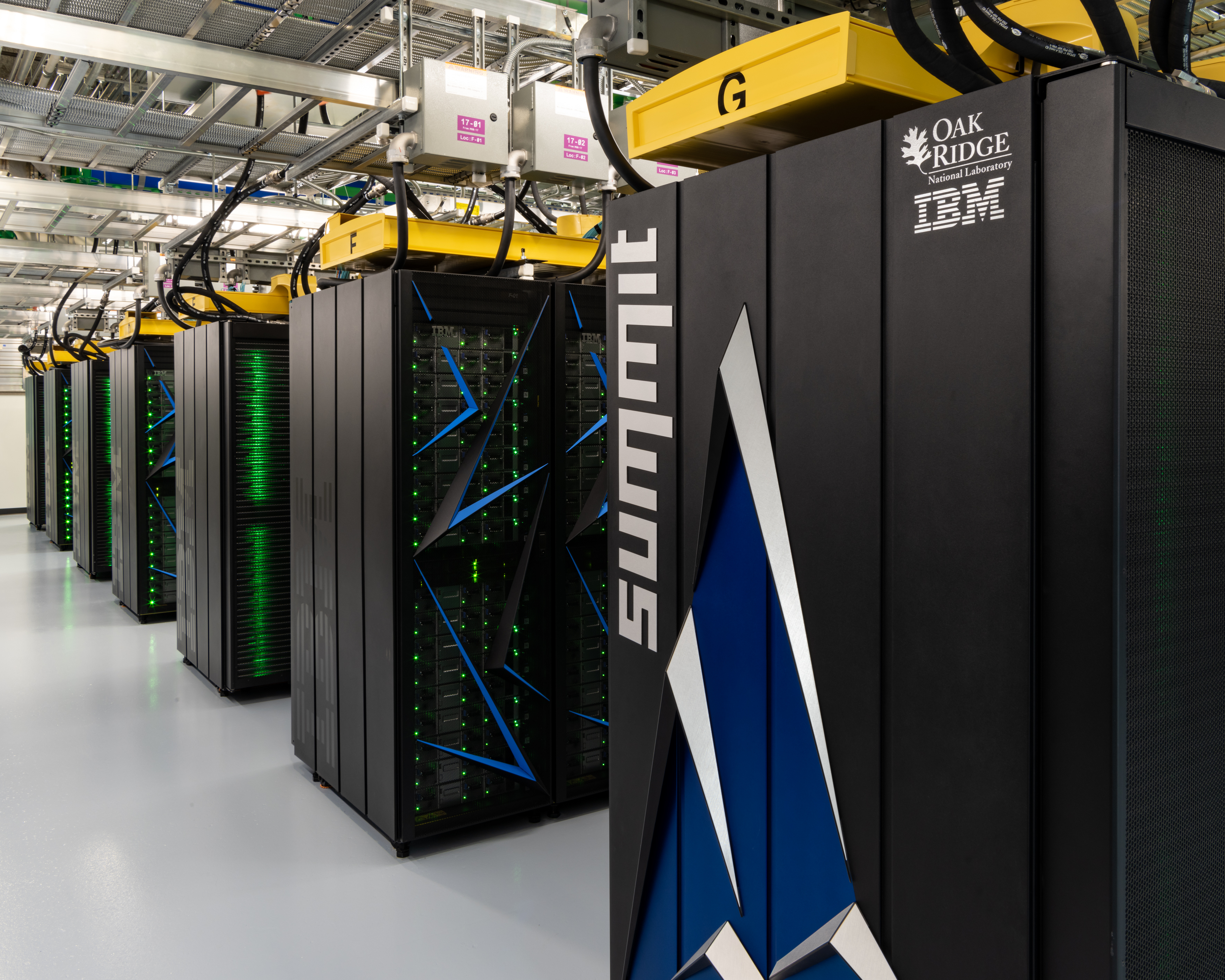
IBM built Summit & Sierra - Power Accelerated Computing Platform - Most powerful computers on Palnet

Supercomputing is the Formula One of computing. It’s where companies test bleeding-edge technology at an unprecedented scale. Supercomputers are generally used for research purposes, including tasks such as the virtual testing of nuclear bombs, trying to understand how the universe was formed, forecasting climate change and aerodynamic modeling for aircraft. 

        The U.S. now has two machines atop the world’s supercomputer rankings, with a pair of IBM  built systems holding first and second place. Summit and Sierra, supercomputers at Oak Ridge National Laboratory and Lawrence Livermore National Laboratory, are now ranked the #1 and #2 fastest computers. They are helping us model supernovas, pioneer new materials and explore cancer, genetics and the environment — using technologies available to all businesses.

The Design, Deployment, and Evaluation of these CORAL Pre-Exascale System are available at : http://sc18.supercomputing.org/proceedings/tech_paper/tech_paper_files/pap277s5.pdf where CORAL =  Collaboration of Oak Ridge, Argonne & Lawrence Livermore National Labs

Summit is owned by the Oak Ridge National Laboratory and is designed for artificial intelligence workloads that pertain to high-energy physics and materials discovery, among other things. The lab claims it can perform more than 3 billion-billion calculations per second in some cases. Summit, an IBM-built supercomputer now running at the Department of Energy’s (DOE) Oak Ridge National Laboratory (ORNL), captured the number one spot with a performance of 122.3 petaflops on High Performance Linpack (HPL), the benchmark used to rank the TOP500 list. Summit has 4,356 nodes, each one equipped with two 22-core Power9 CPUs, and six NVIDIA Tesla V100 GPUs. The nodes are linked together with a Mellanox dual-rail EDR InfiniBand network.

The Summit's theoretical peak speed is 200 petaflops, or 200,000 teraflops.To put that in human terms, approximately 6.3 billion people would all have to make a calculation at the same time, every second, for an entire year, to match what Summit can do in just one second.

 
source
source
ORNL ESS Storage

Sierra is jointly operated by the DOE’s National Nuclear Security Administration and the Lawrence Livermore National Lab.Sierra, a new system at the DOE’s Lawrence Livermore National Laboratory took the number three spot, delivering 71.6 petaflops on HPL. Built by IBM, Sierra’s architecture is quite similar to that of Summit, with each of its 4,320 nodes powered by two Power9 CPUs plus four NVIDIA Tesla V100 GPUs and using the same Mellanox EDR InfiniBand as the system interconnect.
source


source


Both CORAL pre-exascale machines are powered by a combination of IBM’s Power9 central processing units and Nvidia Corp.’s V100 graphics processing units. They’re enormous too, made up of numerous rows of refrigerator-sized computer cabinets. Summit boasts 2.4 million processor cores in total, while Sierra has 1.6 million.
source
Power AC922 Memory DIMM

IBM defines floating-point encoding as "a method of encoding real numbers within the limits of finite precision available on computers.". FLOPS is a common measure for any computer that runs these applications. In descending order of size are: yottaflop, zettaflop, exaflop, petaflop, teraflop, gigaflop and megaflop.

The 54th Top500, revealed on November 18, 2019 at SC19, is a familiar list: the U.S. Summit (ORNL) and Sierra (LLNL) machines, offering 148.6 and 94.6 petaflops respectively, remain in first and second place.

https://www.hpcwire.com/2019/11/18/top500-us-maintains-performance-lead-arm-tops-green500/ 

NOTE:Next, World’s fastest supercomputer will be built by AMD and Cray for US government. Frontier is expected to go online in 2021 with 1.5 exaflops of processing power. . (One exaflop is a thousand petaflops or a quintillion, 10 power 18, double precision floating point operations per second.) . Also, Supercomputer Fugaku, A64FX 48C 2.2GHz, Tofu interconnect D, Fujitsu ,RIKEN Center for Computational Science,Japan

Recently, IBM launched early Access program for  Power Linux servers in the IBM Virtual Private Cloud. Its a New Generation of IBM Cloud Virtual Servers for VPC. Users can now access AC922 supercomputer level performance with 2 Power CPU's, a Terabyte of Memory, 2-100Gbit Ethernet Links, and 4 NVIDIA v100 GPUs with NVLink2 CPU-GPU connectivity (7-10X faster than the competition). This enables a new generation of AI, Machine Learning and Deep Learning applications, running on the IBM Cloud, which deliver business insight 3-4X faster than competitors.  Travis CI has launched enhancements to their build service which adds capability to now do builds on IBM Power, IBM Z and LinuxONE. This now enables tens of thousands of open source communities to enable their software on IBM platforms.

Reference:
http://www.sachinpbuzz.com/2019/07/ibms-summit-sierra-most-powerful.html?showComment=1576580688601
http://www.ieee-hpec.org/2018/2018program/index_htm_files/135.pdf 
https://blog.travis-ci.com/2019-11-12-multi-cpu-architecture-ibm-power-ibm-z
https://www.ibm.com/cloud/blog/announcements/next-gen-virtual-servers-vpc 

https://qz.com/1301510/the-us-has-the-worlds-fastest-supercomputer-again-the-200-petaflop-summit/

HPC Parallel Computing Platforms and Methodologies - General Purpose Computing on Graphics Processing Units [GPGPU]

source
High-performance computing means the use of multiple CPU/GPU cores and parallel processing, but there are many ways to address the software implementation. Accelerator-based heterogeneous computing is gaining momentum in the high-performance computing arena. However, the increased complexity of heterogeneous architectures demands more generic, high-level programming models. OpenACC is one such attempt to tackle this problem. Many modern parallel computing systems are heterogeneous at their node level. Such nodes may comprise general purpose CPUs and accelerators (such as, GPU, or Intel Xeon Phi or FPGA) that provide high performance with suitable energy-consumption characteristics. There are various parallel programming approaches (such as OpenMP, OpenACC, OpenCL, CUDA) and selecting the one that is suitable for a target context is pretty challenging. OpenMP and OpenACC  are directive based programming approaches. whereas, OpenCL and Cuda are  parallel computing frameworks that enable programming languages such as C, C++,python and Fortran. Besides the obvious use-case of a Graphics Processing Unit (GPU), namely rendering 3D object, it is also possible to perform general-purpose computations using frameworks like OpenCL or CUDA. (well known use-case is bitcoin mining).Other interesting use-case: image processing.

HPC Parallel Computing Platforms and Methodologies

GPGPU is the utilization of a GPU (graphics processing unit), which would typically only handle computer graphics, to assist in performing tasks that are traditionally handled solely by the CPU (central processing unit). GPGPU allows information to be transferred in both directions, from CPU to GPU and GPU to CPU. Such bidirectional processing can hugely improve efficiency in a wide variety of tasks related to images and video. If the application you use supports OpenCL or CUDA, you will normally see huge performance boosts when using hardware that supports the relevant GPGPU framework.

NVIDIA was an early and aggressive advocate of leveraging graphics processors for other massively parallel processing tasks (often referred to as general-purpose computing on graphics processing units, or GPGPU). However, GPGPU has been embraced in the HPC (high-performance computing) server space, and NVIDIA is the dominant supplier of GPUs for HPC. CUDA (Compute Unified Device Architecture) is a parallel computing platform and programming model for NVIDIA GPUs (Graphics Processing Units) and NVidia's proprietary parallel computing programming model. CUDA provides an interface to NVIDIA GPUs through a variety of programming languages, libraries, and APIs. A "CUDA Core" is NVidia's equivalent to AMD's "Stream Processors".  AMD acknowledges that it is there with the company's ROCm (Radeon Open Compute Platform) initiative. AMD is behind, but that doesn’t mean they’re not trying to catch up. When CUDA was first introduced by Nvidia, the name was an acronym for Compute Unified Device Architecture, but Nvidia subsequently dropped the common use of the acronym. 
source
CUDA provides both a low level API (CUDA Driver API, non single-source) and a higher level API (CUDA Runtime API, single-source). The CUDA runtime makes it possible to compile and link your CUDA kernels into executable. This means that you don't have to distribute cubin files with your application, or deal with loading them through the driver API. As you have noted, it is generally easier to use. In contrast, the driver API is harder to program but provided more control over how CUDA is used. The programmer has to directly deal with initialization, module loading, etc. Apparently more detailed device information can be queried through the driver API than through the runtime API. For instance, the free memory available on the device can be queried only through the driver API. 

NOTE:Parallel portions of an application are executed on the device as kernels. Many CUDA threads execute each kernel at a time. Cuda threads are large in number (say 1000) compared with muti-core CPU threads. A cuda kernel is executed by array of threads and all threads run the same code. Here ,  Device=GPU, HOST=CPU,Kernel=function that runs on device.

OpenCL™ (Open Computing Language) framework is the open, royalty-free standard for cross-platform, parallel programming of diverse processors found in personal computers, servers, mobile devices and embedded platforms. OpenCL greatly improves the speed and responsiveness of a wide spectrum of applications in numerous market categories including gaming and entertainment titles, scientific and medical software, professional creative tools, vision processing, and neural network training and inferencing. It is maintained by the industrial consortium Khronos. OpenCL 2.2 brings the OpenCL C++ kernel language into the core specification for significantly enhanced parallel programming productivity. Developers program at a higher level than OpenCL C or C++, but always have access to lower-level code through seamless integration with OpenCL, C/C++ libraries, and frameworks such as OpenCV™ [Open Computer Vision] or OpenMP™ [Open Multi Processing]. 
 
source

OpenCV (Open source computer vision) is a library of programming functions mainly aimed at real-time computer vision developed by Intel. In simple language it is library used for Image Processing. It is mainly used to do all the operation related to Images. OpenCV supports a lot of algorithms related to Computer Vision and Machine Learning OpenCV is written in C++ and its primary interface is in C++. OpenCV-Python is the Python API of OpenCV. It combines the best qualities of OpenCV C++ API and Python language. It will use optimized routines to accelerate. Interfaces (1) & (2) are also under active development for high-speed GPU operations.
1) A CUDA-based GPU interface
2) An OpenCL-based GPU interface 
 
OpenMP and OpenACC enable directive-based parallel programming.OpenMPI tries to take advantage of multiple CPU cores, OpenAcc tries to utilize the GPU cores. OpenMP enables parallel programming on shared-memory computing platforms, as for example multi-core CPUs. It is very easy to use, since it is sufficient to tell the compiler some directives (code annotations, or pragmas) on how to extract the parallelism which triggers the synthesis of a parallel version of the input source code. OpenACC is a collection of compiler directives to specify parts of a C/C++ or Fortran code to be accelerated by an attached accelerator, as a GPU. It follows pretty much the same philosophy of OpenMP and enables creating high-level host+accelerator programs, again without the need of managing the accelerator programming language. For example, OpenACC will let you simply accelerate existing C/C++ codes without needing to learn CUDA (with some performance penalty, of course). OpenACC enables hybrid CPU+GPU programming. You can also mix OpenMP and OpenACC directives. For example, in a 4-GPU system, you can create 4 CPU threads to offload computing work to the 4 available GPUs. This is described in the Shane Cook book. However, it should be mentioned that OpenMP 4.0 foresees also directives for offloading work to attached accelerators.Often considered siblings, OpenMP and OpenACC share a long list of similarities, but with a few notable differences driven by philosophy. While OpenMP believes compilers are dumb and users are smart, the OpenACC mantra in compilers can be smart, and even smarter with the user’s help. For example, OpenMP isn’t dependency-aware and will attempt to parallel whatever the user requests, while OpenACC will refuse to parallel if the compiler detects an error.
The main difference between OpenGL and OpenCL is that the OpenGL is used for graphics programming while the OpenCL is used for heterogeneous computing. OpenGL is a cross-platform application programming interface (API) for rendering 2D and 3D vector graphics [create 2D (Triangle, Polygons, and Hexagons, etc.) and 3D objects (Cube, Sphere, and Torus, etc.)] while OpenCL is a framework for writing programs that execute across heterogeneous platforms where developers write programs for systems with multiple CPUs, GPUs, Digital Signal Processors (DSP), Field Programmable Gate Arrays (FPGAs), etc. Both OpenGL and OpenCL are managed by Khronos Group.
source
 

How do OpenCL and CUDA fit into the equation? OpenCL is currently the leading open source GPGPU framework. CUDA, on the other hand, is the leading proprietary GPGPU framework. It should be noted that Nvidia cards actually support OpenCL as well as CUDA, they just aren’t quite as efficient as AMD GPUs when it comes to OpenCL computation .Unlike OpenCL, CUDA-enabled GPUs are only available from Nvidia.
source

CUDA and OpenCL offer two different interfaces for programming GPUs. OpenCL is an open standard that can be used to program CPUs, GPUs, and other devices from different vendors, while CUDA is specific to NVIDIA GPUs. Although OpenCL promises a portable language for GPU programming, its generality may entail a performance penalty.  CUDA can be used in two different ways, (1) via the runtime API, which provides a C-like set of routines and extensions, and (2), via the driver API, which provides lower level control over the hardware but requires more code and programming effort. Both OpenCL and CUDA call a piece of code that runs on the GPU a kernel. OpenCL promises a portable language for GPU programming, capable of targeting very dissimilar parallel processing devices. Unlike a CUDA kernel, an OpenCL kernel can be compiled at runtime, which would add to an OpenCL’s running time. On the other hand, this just-in-time compile may allow the compiler to generate code that makes better use of the target GPU.

To compete with CUDA, AMD has shifted from OpenCL to its ROCm platform. AMD is also developing a thin "HIP" compatibility layer that compiles to either CUDA or ROCm. AMD's hipBLAS, hipSPARSE, and hipDNN all translate to the cu- or roc- equivalents, depending on hardware target. So, for example, hipBLAS would link to either cuBLAS or rocBLAS. On the hardware side, AMD's Radeon VII now looks competitive with, e.g. Nvidia's 2080 Ti. AMD now offers HIP, which converts  CUDA, such that it works on both AMD and NVIDIA hardware. Once the CUDA-code has been translated successfully, software can run on both NVIDIA and AMD hardware without problems.

NOTE: OpenCL and OpenACC are generic frameworks for heterogeneous programming using CPU and accelerator devices such as GPUs. They have contrasting features: the former explicitly controls devices through API functions, while the latter generates such procedures along a guide of the directives inserted by a programmer.

OpenACC and OpenCL may be candidates
  1. Dealing with inside the node
  2. Part of a standardization initiative
  3. OpenACC complementary to OpenCL 
OpenACC and OpenMP focuses parallelism within a single "shared" node. OpenACC is a directives-based programming approach to parallel computing designed for performance and portability on CPUs and GPUs for HPC. Adding OpenACC has given the ability to migrate medium-sized simulations from a multi-node CPU cluster to a single multi-GPU server.Compiler uses these directives to automatically generate device specific application code [NO programming with vendor specific languages]. We already know that OpenMP has been making programming CPUs easy and portable. Similarly, a directive-based programming model for accelerators is OpenACC that is gaining popularity since the directives play an important role in developing portable software for GPUs.  A combination of OpenMP and OpenACC, a hybrid model, is a plausible solution to port scientific applications to heterogeneous architectures especially when there is more than one GPU on a single node to port an application to.  
    Radeon Open Compute Platform (ROCm) :
    ROCm is a universal platform for GPU-accelerated computing. A modular design lets any hardware vendor build drivers that support the ROCm stack. ROCm also integrates multiple programming languages and makes it easy to add support for other languages. 

    The Department of Energy announced that Frontier, their forthcoming supercomputer in 2021, will have AMD Radeon Instinct GPUs. This is a $600M contract. It seems there will soon be growing pressure for cross-platform (Nvidia/AMD) programming models in the HPC space.The $600 million award marks the first system announcement to come out of the second CORAL (Collaboration of Oak Ridge, Argonne and Livermore) procurement process (CORAL-2). Poised to deliver “greater than 1.5 exaflops of HPC and AI processing performance,” Frontier (ORNL-5) will be based on Cray’s new Shasta architecture and Slingshot interconnect and will feature future-generation AMD Epyc CPUs and Radeon Instinct GPUs. This will start with Cray working with AMD to enhance these tools for optimized GPU scaling with extensions for Radeon Open Compute Platform (ROCm). These software enhancements will leverage low-level integrations of AMD ROCmRDMA technology with Cray Slingshot to enable direct communication between the Slingshot NIC to read and write data directly to GPU memory for higher application performance.

    Exploring AMD’s Ambitious ROCm Initiative :
    AMD released the innovative ROCm hardware-accelerated, parallel computing environment, and since then, the company has continued to refine its bold vision for an open-source, multi-platform, high-performance computing environment. Over the past two years, ROCm developers have contributed many new features and components to the ROCm open software platform. Now, the much-anticipated release of the Vega 7nm technology based GPU environment adds another important ingredient to the mix, empowering a second generation of high-performance applications that will benefit from ROCm’s acceleration features and “write it once” programming paradigm.

    ROCm is a universal platform for GPU-accelerated computing. A modular design lets any hardware vendor build drivers that support the ROCm stack. ROCm also integrates multiple programming languages and makes it easy to add support for other languages. ROCm even provides tools for porting vendor-specific CUDA code into a vendor-neutral ROCm format, which makes the massive body of source code written for CUDA available to AMD hardware and other hardware environments.
    ROCm is designed as a universal platform, supporting multiple languages and GPU technologies. 
     
    source

    Lower in the stack, ROCm provides the Heterogeneous Computing Platform, a Linux driver, and a runtime stack optimized for “HPC and ultra-scale class computing.” ROCm’s modular design means the programming stack is easily ported to other environments.

    At the heart of the ROCm platform is the Heterogeneous Compute Compiler (HCC). The open source HCC is based on the LLVM compiler with the Clang C++ preprocessor. HCC supports several versions of standard C++, including C++11, C++14, and some C++17 features. HCC also supports GPU-based acceleration and other parallel programming features, providing a path for programmers to access the advanced capabilities of AMD GPUs in the same way that the proprietary NVCC CUDA compiler provides access to NVIDIA hardware. 

        Important features include the following:
    • Multi-GPU coarse-grain shared virtual memory
    • Process concurrency and preemption
    • Large memory allocations
    • HSA signals and atomics
    • User-mode queues and DMA
    • Standardized loader and code-object format
    • Dynamics and offline-compilation support
    • Peer-to-peer multi-GPU operation with RDMA support
    • Profiler trace and event-collection API
    • Systems-management API and tools

      Solid Compilation Foundation and Language Support

    • LLVM compiler foundation
    • HCC C++ and HIP for application portability
    • GCN assembler and disassembler

    How does HIP work?

    The below image explains it: CUDA gets converted to HIP and HIP gets compiled for the NVIDIA GPU with NVCC, and for the AMD GPU with their new C++ compiler HCC.

    source
     AMD announced its next-gen Navi-based Radeon RX 5700 and 5700 XT graphics cards recently.If you’re an AMD fan hoping that this will be the moment in history when the company finally pulls ahead of Nvidia with a high-end video card — like it may be doing against Intel with desktop CPUs — this isn’t that moment.  Despite its new Navi architecture, which offers 1.25x the performance per clock and 1.5x performance per watt, these aren’t even as high-end as AMD’s existing (and complicated) 13.8 TFLOP Radeon VII GPU. At up to 9.75 TFLOPs and 7.95 TFLOPs of raw computing power respectively, and with 8GB of GDDR6 memory instead of 16GB of HBM2, the 5700-series isn’t a world-beater.
    source

    source

    Intel announced that its first "discrete" graphics chip (GPU) is coming in 2020. By "discrete GPU", the company means a graphics chip on its own, an entirely separate component that isn't integrated into a processor chip(CPU). Typically , Intel GPUs are integrated with its CPUs. Intel's GPU will be released in 2020 will be designed for enterprise applications like machine learning , as well as consumer level applications that benefit from the dedicated power of  discrete GPUs.

    We eagerly await doing the price/performance comparisons across these enterprise GPU compute engines.

    Reference :
    http://www.admin-magazine.com/HPC/Articles/Discovering-ROCm
    https://www.bdti.com/InsideDSP/2016/12/15/AMD 
    https://www.khronos.org/opencl/ 
    https://www.electronicdesign.com/embedded-revolution/choosing-parallelization-technique-what-s-best-path
    https://sabripllana.eu/papers/arms_cc_2017.pdf 
    https://towardsdatascience.com/get-started-with-gpu-image-processing-15e34b787480